Appearance
How to Create Song Slides
- Open Presentation Creator v2.0
- Make sure the template is set to 'Single Slide Template (No Transition)--Widescreen'

- Find a song in the list by scrolling or searching with the Hymn Text Search
- Right-clicking on the songs gives various presets for the song (all verses, first and last verse, etc)
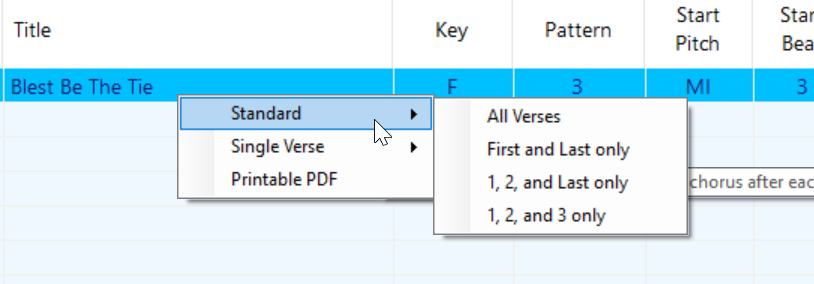
- Right-clicking on the songs gives various presets for the song (all verses, first and last verse, etc)
- Add all songs that you can using this method
- Any songs in the main songbook, Hymns for Worship, or its supplement can be added here
- Other "auxillary" songs have standalone powerpoints that we copy from
- Once you're done, press F8 or click 'Export to Powerpoint' in the 'Presentation' menu

- Name the file '<YYYY-MM-DD> <service> <AM|PM>.pptx'. For example, '2024-10-16 Wednesday PM.pptx'
- Open the exported Powerpoint
- In PowerPoint, create a new powerpoint using the appropriate service template.
- Click 'File' -> 'New' -> 'Sunday/Wednesday Service'
INFO
TO BE CONTINUED